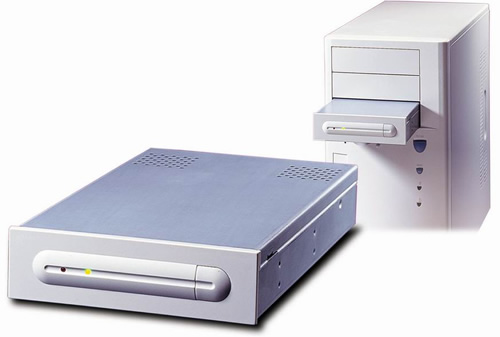
Smart Internal Series
SI-300/550/600
SI series is the industries first and only uninterruptible power supply system (UPS) with the ability to be mounted into a PC case using a 5 1/4" drive bay. A fully integrated UPS with all the necessary components of a traditional UPS in a single box. Providing convenient, space saving, hassle free, and power protection solution to mission-critical computing environments.
Special Feature
-
Suitable for 5 1/4 disk size.
- Micro-processor based design, more reliable & friendly.
-
Auto-select frequency.
- "Green
Power" design for saving battery life.
- Multifunction button for alarm reset, power off, & self-test (DC
start).
-
Warning for battery replacement.
- Compatible with Windows 95/98/2000 /NT/ME, Linux, SCO UNIX, &
DOS.
-
AT/ATX computer compatible.
-
Easy installation.
- This is a CE Certificated Product.
Hardware Review by: Rob Hughes (05/04/2000) Click here  to read the review.
Additional Information
INSTALLATION OVERVIEW
PRECAUTION:
- This UPS is suitable only for personal computer or workstation use, and is to be installed inside a computer case.
- When installing, please make sure the maximum power requirement is not over the rated capacity of the UPS. The Red LED will be lighted and an alarm will beep if the load is close to the rated value. Meanwhile, if a blackout occurs and the overload is severe the UPS will shut down immediately to protect itself.
- Please charge for at least 12 hours before the first use.
INSTALLATION:
- Fix the metallic window plate on the rear panel of your computer case.
- Plug the connector of the enclosed "Y" type power cord into the window plate.
- Plug the connector of the power cord from the UPS with the matching connector of "Y" power cord.
- Connect "Y" power cord with the inlet of your computer, and the original power cord of your computer respectively.
Click here for an animated illustration.
Flash player is required to view these animated illustrations, click here to download it.
TEST STEPS:
- Please have the UPS charged for 12 hours before test. (There is no need to turn your computer on, just to keep the city power connected to the computer.)
- With normal mode of UPS, turn on your computer, push the UPS button on the front panel for self-test. If it is OK, green LED will be on. While if it is over loaded, the UPS will alarm. Or if the battery level is low, it will have quick beeping for several seconds and stay in normal mode for recharging.
- Push the button for 4-5 second. To check if the UPS can be turned-off manually.
- Push the button again to turn on the UPS, then UPS will enter standby status, and finish the test.
- IF ANY ABNORMAL CONDITION OCCURS, PLEASE PUSH THE BUTTON FOR AT LEAST 5 SECONDS TO SHUT DOWN THE UPS; THEN WAIT FOR 3 SECONDS AND RE-PUSH THE BUTTON TO RESTART THE UPS.
Specification Sheet
To obtain this product's specification sheet, please
click here.
Arcobat reader is required to view these catalogue, click here to download it.
|